Architecture & Engineering
Your whole IT stack watched, patched, and backed up from end to end, ensuring your tools always perform the way you need them to, and your firm stays productive.
Are You Letting Faulty IT Undercut The Tools Your Firm Depends On?
Architecture and engineering firms run on heavy design software most of the working day. A frozen Revit session, a slow AutoCAD save, or a file-share outage kills the billable hours of every single person on the project team at once.
NetConnect has been the IT partner to tri-state architecture and engineering firms since 1992, and our engineers know the CAD workstation, the office network, the file share, and the Autodesk licensing portal the way your project managers know permit sets.
What Our IT Services Do For Your Firm
Run Autodesk, Revit, and AutoCAD on workstations that never stall out.
Keep the SolidWorks calc model loading inside the minute it should.
Move large BIM file bundles between office and client without a hitch.
Protect the project IP the client trusts you to hold without leaks.
Back up the CAD drawings ahead of the design review freeze.
we believe in earning your trust through proven results, not a glossy sales deck
here is what thirty-four years of doing the work

A NetConnect Client For Over 20 Years
"I want to express my heartfelt gratitude to the NetConnect team. They're always there for us, showing true dedication in sales and support. In emergencies, they're lightning-fast, unlike other vendors. NetConnect truly delivers on their promises.."
Private Education

NetConnect Takes a Multi-Tiered Approach
"They respond promptly to our time-sensitive needs and consistently exceed our expectations. Their transparent approach prioritizes quality within our budget, with a focus on long-term success. They invest in employee development for top-notch service, and truly understand our business"
Not-For- Profit

Top Notch Service From A Top Notch Company
"It's reassuring to have responsive IT support and knowing that skilled technicians are always ready to ensure our systems run smoothly. Their proactive monitoring, data backup, and security measures provide peace of mind."
Wealth Management
How We Optimize IT For Firms Like Yours
An architecture firm and an engineering firm do not look alike from the outside, but their IT stacks carry the same weight. Autodesk, BIM, large files, IP protection, and a design review calendar that does not care if the network is having a quiet week.
Optimized Design Software
Design software runs the work itself. Autodesk, Revit, and SolidWorks are the first places our team looks when things slow down because a stalled license server quietly costs billable hours.
Agile & Available
BIM bundles, Revit central files, and AutoCAD drawings are too large for a consumer file share. The network, the storage, and the backup system all get sized for engineering weight.
IP Stays In The Building
The drawings the firm owns are the product. Role-based access, encrypted file share, and logged external transfers mean IP leaves the building only through doors the principal signed off on.
Fit To Your Project Cycle
Hardware quotes, software renewals, and project billing line up with the design phase calendar your firm already invoices against. Large IT lifts happen during the quieter stretches between submissions.










Are Your IT Systems Holding Your Firm Back?
Most of the calls we take from managing principals at architecture and engineering firms start with a frozen Revit model, a cloud save that never finishes, or a client design review where the file would not pull up on the projector in the conference room on time.
The same owners describe the pattern almost the same way every time. The ticket volume got too big for the office manager, the IT vendor before us kept missing SLAs, and the server room has three things nobody remembers installing. You want a grown-up in the room.
We Can Help
Thirty-four years of running IT for New York and New Jersey businesses changes how you work with other companies' offices. We have seen the same ransomware, the same cloud migration mess, and the same audit scramble more times than any new vendor will in a decade.
Everyone who picks up your call when it rings works out of our Staten Island office. The team member working on your network this week is still going to be here a year later. We document everything we build, and we hand it off to your team in plain English.
Support for Your Design Software Stack
Autodesk, Revit, SolidWorks, And The Workstations They Run On
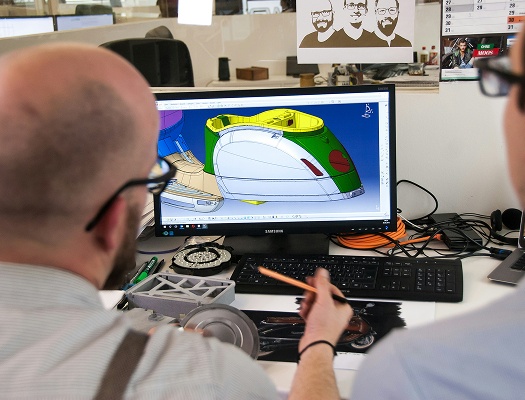
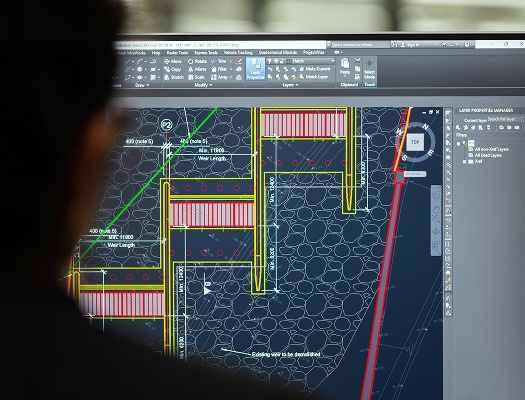
Autodesk licensing, Revit central files, AutoCAD drawing sets, and the SolidWorks installations that live on the engineering floor all have to run on the same morning without asking the principal to reboot. Our arrangement starts with a current inventory of every workstation, every license, and every vendor behind them. From there our engineers keep the software stack patched, the license server responding, and the GPU drivers current with the Autodesk release schedule the firm is tracking.
A CAD workstation is not an office laptop. The machine has a heavy GPU, a vendor-signed driver stack, and a license dongle or cloud entitlement that has to respond before the first plot starts. A cold reboot during the afternoon is not a recoverable event. When our engineers touch that machine, the ticket stays open until the principal can save, plot, and render the way the project actually needs it done the next morning.
An inventory of every Autodesk, Revit, and SolidWorks license on file.
GPU drivers and plotter drivers stay current with the design-software release.
A licensing portal managed on the firm’s behalf without vendor runaround.
Large File Sharing And Project Collaboration
BIM Bundles, Large CAD Files, And Secure Client Review Links
A structural calculation package or a BIM bundle is too heavy for the file share the office staff uses to email a PDF. Our team sizes the file-sharing platform, the WAN uplink, and the backup target to the real weight of the drawings your projects move. External review links carry an expiry and a log. Internal shares get the same role-based controls the firm already uses on the network storage, so a project drawing never lands in a personal Dropbox by accident.
File sharing at an architecture or engineering firm is not a simple drag and drop. A consultant on the other end of the link is working against a review deadline of their own. The platform has to move the file quickly, prove the file was received, and log the transfer for later reference when the submission goes to the municipality. Here is how that plays out across a typical project week.
A file-share sized for the largest drawing the project actually moves.
External client review links that expire and get logged per project.
Internal file storage under the same controls as the network server.
IP Protection And Cybersecurity
Protect Design IP, Client Data, And Project Drawings From Theft
Design IP is the product an architecture or engineering firm sells. A stolen drawing set, a ransomware incident on the central Revit server, or a phishing email that walks a staff accountant into transferring a client retainer to a bad actor all land the same way on the balance sheet, and the firm takes the loss. Our arrangement covers multi-factor authentication on every login, endpoint detection and response across the workstation floor, and phishing training built for design-firm staff.
Security at a design firm is not a compliance checkbox. The drawings on the Revit server are the business itself, and the cyber carriers know it. Our engineers build the controls the carrier will actually require on the renewal questionnaire, and the staff training gets tuned to what a real phishing email aimed at an architect or engineer actually looks like. Here is what the security side of the service covers.
Multi-factor authentication on every login the firm’s staff uses daily.
Endpoint detection and response running on workstations and laptops.
Phishing training tuned to the emails a design-firm inbox really sees.
Why Architecture And Engineering Firms Trust Us
Between the client design review where the Revit model would not open and the cyber insurance renewal where the carrier rejected the answers the old vendor wrote up, every managing principal eventually realizes that outsourcing IT to a vendor on autopilot has run out of useful life.
Design Work Keeps Flowing
The Revit central file opens on the first click. The AutoCAD drawing saves inside the window the team expects. Nobody at the firm spends a Thursday afternoon chasing a license server that finally stopped responding mid-plot.
Client Drawings Stay Secure
A phishing email, a lost laptop, or a ransomware alert on the Revit server gets contained quickly. Client drawings do not end up sold, published, or sitting on a criminal forum waiting for a ransom demand.
Comprehensive Support For All Things IT
The Revit workstation, the plotter, the cloud backup, the Outlook login, and the principal’s laptop live on the same ticket line. The front office makes one call when something breaks instead of chasing four separate vendors.
In It For The Long Run
Our longest-running architecture and engineering accounts have been with NetConnect for more than fifteen years, watching principals arrive and retire while the drafting floor, the Revit server, and the plot room stayed documented through leadership changes.
FAQs About Our Services for Architecture and Engineering firms
Does Your Team Support Autodesk, Revit, And SolidWorks Across Our Design Staff?
Yes. Autodesk, Revit, and SolidWorks are among the platforms we support at the infrastructure layer, meaning the workstation the software runs on, the license server it checks in with, and the network storage that holds the central files. When a functional question crosses into how a specific Revit family is modeled, we coordinate directly with the Autodesk reseller on your behalf so the ticket does not stall.
How Do You Handle Large CAD And BIM File Transfers Between Offices?
Large CAD and BIM transfers between offices or out to consultants do not run on a consumer file share. We size the file-sharing platform, the WAN uplink, and the backup target to the largest drawing the firm actually moves. External links carry an expiry and a log of who downloaded what. Internal shares sit under the same role-based controls the firm already uses on the network storage.
Can Your Team Protect Our Design IP From Cyber Theft And Ransomware?
Yes. The controls start with multi-factor authentication on every login, endpoint detection and response across the workstation floor, dark-web monitoring on the firm’s domain, and phishing training tuned to the emails an architect or engineer actually sees. Cyber insurance carriers look at these same controls on the renewal questionnaire, and our team builds the controls the carrier will require on the form.
Will Your Team Replace Our Current Design-Firm IT Vendor Without Any Disruption?
A clean handoff is the only way we run takeovers at a design firm. We start with a current-state inventory of every workstation, every Autodesk subscription, every cloud account, and every vendor behind them. The inventory builds out with your existing vendor at the table, or with your office manager if the prior vendor will not join the call. Every account, license, and password is logged before cutover, and the first weeks run side by side so no project gets dropped.
